
WhatsApp or an email address
The order and the login both travel by WhatsApp or email. Use the number or address you check most often, because that is where the login will land.
How to buy
This page shows how to buy IPTV from Buy IPTV 4K in the order it really happens: you choose a plan, a WhatsApp message carries the order, a payment link takes your card or PayPal, and about 2 minutes after your bank says yes a message brings the login. After that you type the login into a player on each screen and check a few settings on the first evening.
Checklist
Knowing how to buy IPTV starts with six small things. None takes long, and together they make the first evening easy.
The order and the login both travel by WhatsApp or email. Use the number or address you check most often, because that is where the login will land.
A debit or credit card in your name, or PayPal. Keep your banking app close: most UK banks ask you to approve online payments inside it.
Have the brand to hand, and the model number from the sticker or the settings menu if you can find it. Fire TV, Samsung, LG, Google TV, Apple TV, computer and phone each call for a different player.
Allow around 25 Mb/s per screen showing 4K, about 10 for Full HD and 5 or so for HD, without dips during the evening. Most smart TVs and sticks have a network menu or a browser that can measure it where it counts.
Plug a network cable in if the router is within reach. Otherwise join the router’s 5 GHz network, which is quicker than 2.4 GHz but carries less far through walls.
A 4K television or device plugged into HDMI 2.0 or later, and a player whose hardware handles HEVC (H.265). Short of that, 4K titles are shown at the best resolution your kit can manage.
Step by step
Most people finish the purchase in a few minutes. The setup takes longer or shorter depending on the device, and Fire TV sticks need a few extra screens.
Compare the four on the IPTV packages page: Access 3 for 3 months, Access 12 for a year, Access 12 Duo when two TVs must stream together and Access 24 for two years. For most homes we suggest Access 12 at £49.
Under every plan sits a Buy button. Tapping it on your phone hands WhatsApp a finished order line with the plan and price, so all that is left is to press send. Without WhatsApp, the same order works by email to [email protected].
Add one more line naming your device, for instance « Samsung TV from 2021 » or « Fire TV Stick 4K ». Any warning about that model, and the player we would put on it, reach you before a payment link does.
The reply carries a secure link for the exact price of your plan. It opens the payment company’s page, where you choose a debit card, a credit card or PayPal. Your card details are typed there and are never sent to us.
Your bank will usually ask you to confirm: a prompt in its app, a code by text or a code from a card reader. Once you approve, the payment is complete, and it is taken a single time.
Give it about 2 minutes from the bank’s approval, whatever the time of night. The chat or inbox you ordered from then receives six lines, from the username and password down to the date the plan ends.
On each screen, add a compatible player from the device’s own store, such as TiviMate, VLC, IBO Player, Kodi, XP IPTV, Smart IPTV or IPTV Smarters Pro. Make sure the publisher shown under the app is the genuine one.
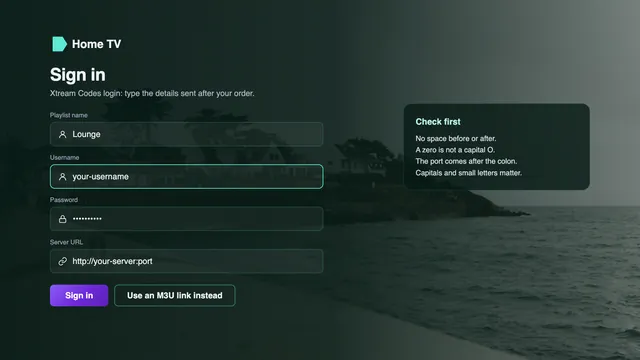
Pick the Xtream Codes option and enter the server URL with its port, then the username and password. Where a player only takes a playlist, paste the M3U link. Channels, films and the guide then load.
Tune to two or three British channels, hold the guide up against your clock, then look over the picture setting and the connection. Ten minutes here spares you a stuttering match night later.
Steps one to six are the purchase, seven to nine the setup. Prefer a hand with the last three? Say so in the chat and the team works through them with you on your own device. The order receipt on our buy IPTV page shows the purchase half of this list as a till roll.
Paying
This is the part of how to buy IPTV where people hesitate most, so here is what each screen does.
The link we send opens a page run by the payment company, not by us. It shows the plan and the total in pounds, and there you choose card or PayPal. Nothing about your card passes through our chat or our inbox.
With a card, your bank steps in next. Most UK card payments online need its approval, called Strong Customer Authentication or 3D Secure: a tap in the banking app, a code by text, or a code from a card reader. A refused approval usually means the bank’s fraud check paused it; approve the payment in the app or call the bank, then open the same link again.
With PayPal, you sign in to your PayPal account or pay with a card through PayPal. What PayPal’s buyer protection covers for digital services is set by PayPal’s current terms, so read them on PayPal’s own pages rather than trusting any seller’s summary, ours included.
The Consumer Credit Act’s Section 75 protection starts at credit-card purchases over £100, so a plan costing £89 or less falls outside it. A chargeback is a different route: your card issuer may reverse a payment for a service you never received, usually if you ask within a window the bank fixes, commonly about 120 days. Talk to us first, as the 7-day refund rule may settle it sooner.
The guides on buying IPTV with a credit or debit card and buying IPTV through PayPal go further into each payment route and what to keep as proof.
Your login
This is the moment how to buy IPTV turns into how to watch it: six lines, each with a purpose.
The message reaches the WhatsApp chat or email address you ordered from about 2 minutes after the payment clears, day or night. It is short, and every line has a job to do.
Save a copy outside the chat as well, in your notes or a password manager. Phones get replaced and chats get cleared, and these few lines are what any player will ask for, today or next year.
Nothing arrived? Skip ahead to the table further down, or read the guide to what instant delivery means in minutes.
What reaches your phone about 2 minutes after paying
Masked on purpose. Your real values appear in your own message and nowhere on this site.
Your account name on the server. Upper and lower case are not interchangeable, so copy it exactly.
Goes with the username. Players hide it while you type, so enter it slowly, or paste it if the device lets you.
The address of the server, written as http://your-server:port. The number after the colon is part of it; a login without it is refused.
One long address holding the whole channel list, for players that take a playlist instead of an Xtream login, such as VLC or Kodi.
Feeds seven days of listings into players that load the M3U link. With the Xtream login, the guide comes by itself.
The last day of your plan. Nothing renews after it, and buying again gets you fresh details for the apps you already have.
Your screens
Apps, boxes and sticks are made by other companies; we sell none of them. These are the players that suit each family of devices.
The Amazon Appstore does not carry IPTV Smarters Pro. Get Downloader (from AFTVnews) in the Appstore, then in Settings › My Fire TV › Developer options give Downloader permission under Install unknown apps. Developer options hidden? Go to About in the same My Fire TV menu and select the stick’s name seven times. The link to fetch the player comes in your login message. Some recent Amazon models run Vega OS, which shuts out apps from anywhere but the Appstore, so look up yours first. More in buying IPTV for a Firestick.
Model and country decide whether IPTV Smarters Pro is offered in the set’s app store. Smart IPTV is activated once per television, and you send it the playlist from its website with the set’s MAC address; IBO Player ties the playlist to the TV’s MAC or its device key. When neither fits, plug a streaming stick into a spare HDMI socket. See buying IPTV for a Smart TV for each family of sets.
Everything comes from Google Play: XP IPTV, IPTV Smarters Pro, or TiviMate, which is free with premium options you can pay for. An APK picked up from a forum post is a common way for malware to reach a TV, so the Play version is the one to install.
Apple devices install from the App Store and nowhere else; VLC and IPTV Smarters Pro are both there at the time of writing. On the Apple TV, Match Content (in Settings › Video and Audio) has two switches worth turning on: Match Frame Rate and Match Dynamic Range.
Paste the M3U link into VLC and it plays straight away. In Kodi, switch on the PVR IPTV Simple Client add-on before adding the link. A Mac built on Apple silicon has a further choice in the App Store copy of IPTV Smarters Pro.
Google Play carries IPTV Smarters Pro and VLC. Signing in on the phone first is a useful control: if channels play there and not on the TV, the fault lies with the TV’s settings rather than the login.
The developer listed for IPTV Smarters Pro is Tech Smarters Private Limited, and the store page names it « Smarters Pro ». Installing it is free; an optional Premium upgrade can be bought inside it, priced store by store, and no channels come with the app. Look-alike apps exist under similar names.
The login can sit in players on several devices in your home. With a one-screen plan only one of them can be playing at any moment; Access 12 Duo lets two play together. Player apps are legal to install; everyone is responsible for following the rules of the country they watch in.
First login
Where a player gives you the choice, take the Xtream route. Live TV, films, series and listings then arrive as separate sections, each in its own menu, and you never have to hunt for a guide address.
Typing on a TV remote is where most mistakes creep in. A missing http://, a forgotten port, a space left at the end, a capital O typed as a zero: any one of them gets the login refused. Many TVs and sticks accept a USB keyboard, and most makers publish a remote-control app for phones that lets you paste text straight from the message.
Expect a wait the very first time while 40,000+ channels and a week of listings come down; a low-cost stick takes longest. Pressing buttons during that load only slows it. For players that only take a playlist, the guide to M3U playlists and how to load them shows where the link and the guide address go.
| Xtream Codes login | M3U playlist link | |
|---|---|---|
| What you copy from the message | Three short lines | A single long line |
| Typical menu label | « Xtream Codes » or « Xtream Codes API » | « Playlist », « M3U URL » or « Add playlist » |
| Listings | Fetched automatically | Added by hand, using the XMLTV link |
| Best on | The TV or stick you use every night | Computers, and players with no Xtream option |
| Players that favour it | TiviMate, XP IPTV, IBO Player, IPTV Smarters Pro | Kodi, Smart IPTV, VLC |
First evening
Pick any programme in the guide and check its start against the time on your phone. Listings follow UK time, GMT in winter and BST between the last Sunday of March and the last Sunday of October; this page was checked on 5 November 2026, which falls in GMT. If the whole grid sits one hour off, move the « EPG time offset » setting one hour the right way and leave everything else alone.
In the device’s display menu, choose Auto or the top resolution your TV supports. A device whose output is locked to 1080p will downscale every 4K title. Inside the player, set the decoder to hardware if the option exists. HDR and Dolby Atmos only come through on programmes made with them, and only if both the TV and the player handle them.
Run the speed check from the TV or stick between 19:00 and 23:00, the busiest stretch of the British evening, especially at weekends and on big match nights. If the picture pauses, plug in a cable or move to the 5 GHz band with the router close by. Where the router sits at the other end of the house, a powerline kit or a mesh network carries the signal to the TV.
A delay of a few seconds, sometimes nearer thirty, between the broadcast and your screen is part of streaming. It is also why a neighbour sometimes cheers before you see the goal.
No message?
It is rare for nothing to come, and the cause is nearly always one of these four.
| What you see | Likely reason | What to do |
|---|---|---|
| No email a few minutes after paying | Filtered into spam or promotions | Search the inbox for our address, then open spam and promotions |
| Nothing in WhatsApp | The phone was offline, or you are looking in another chat | Open the chat you ordered from and check the phone has signal or Wi-Fi |
| The bank shows no payment | The approval step was not completed | Approve in the banking app or call the bank, then reopen the link |
| Payment taken, still no login | A delay, or a mistyped email address | Write with the time you paid and the plan; the team checks the order and resends |
Write to us on WhatsApp or at [email protected] with the time you paid, the plan and the number or address the order came from. If the login never reaches you, the 7-day refund rule applies and you are repaid through the same card or PayPal account.
FAQ
The order and payment take a few minutes, then roughly 2 more pass before the login reaches you. Setting up depends on the device: a phone is quickest, while a Fire TV stick asks for a handful of extra menus to let Downloader in.
Neither. Ordering is a WhatsApp message or an email, and the payment happens on the payment company’s page, so the site never asks you to register or to type a card number.
Yes, through a PayPal account. We take card or PayPal only, never bank transfer, gift cards or crypto.
They guide you on WhatsApp step by step while you hold the remote: which player to install, where to type each line and which setting to change. A photo of your screen helps them follow along.
Ask before paying. If the TV has no compatible player, a streaming stick plugged into an HDMI socket usually solves it, and the team says so before any payment link is sent.
Only at step one: choose Access 12 Duo. Payment and delivery are identical, and the same login is then typed into a player on each of the two TVs, which can stream at the same time.
Only steps one to six, and step eight. The players stay installed; you replace the old username, password and server with the ones in the new message.
Now you know how to buy IPTV here: pick a plan, settle it once by card or PayPal, and wait a couple of minutes for the message with your login and its final day. Should nothing play at home even with our help, 7 days are yours to claim the money back.