
A fixed-term login
A username and password plus the server address, read by a player app. It works up to its end date, then switches off on its own.
One checkout · one login · an end date in writing
When you buy IPTV from Buy IPTV 4K, you pay once for a login: not a box, not an app and not a contract. That login unlocks 40,000+ live channels, British groups listed first, plus 120,000 films and series, with 4K on whatever was produced in 4K. The receipt beside this text lists every line of an Access 12 order, from the price to the last day, and nothing is added once you have paid.
One paymentnothing taken later
Buy IPTV 4K#BIP-ACC12
Checkout · 5 Nov 2026 · card or PayPal
Total, paid oncePaid£49.00
Apps that open your order



The receipt, line by line
A till receipt is the plainest way to show a purchase. Below, each line of ours is spelt out: what it pays for, and what it does not.
| Receipt line | Amount or value | What it means for you |
|---|---|---|
| Access 12 · 12 months · 1 screen | £49.00 | The plan: one login, one screen playing at a time, twelve months from the day you pay. |
| Setup help on WhatsApp | £0.00 | The team talks you through the player on your TV, stick or phone, as often as needed. |
| Delivery of the login | £0.00 | Nothing goes by post. The details come as a message: no courier, no postage, no handling. |
| Total, paid once | £49.00 | The one amount taken, in pounds, by debit or credit card or PayPal. No deposit, no balance later. |
| Login sent | about 2 min after paying | Timed from the confirmed payment, nights and weekends included. |
| Runs | 5 Nov 2026 → 5 Nov 2027 | Day one is the day you pay; the last day is the same date a year on. Your message repeats both. |
| Renews | never by itself | No saved card and no mandate, so the end date has nothing to charge. |
| Money back | 7 days if no picture | A full refund inside that window if the login never comes, or if no screen shows anything even with the team’s help. |
| Per month | £4.08 | The total split over twelve months, for comparing with monthly prices. Nobody bills you monthly. |
A username and password plus the server address, read by a player app. It works up to its end date, then switches off on its own.
We sell no hardware. The TV, stick, phone or computer you own does the playing; a new device would add no channels.
Players like TiviMate, IBO Player and IPTV Smarters Pro are made by other companies. Some are free, some charge for extras.
From Cornwall to Shetland the login reaches you the same way, as a message, so no address is too far.
It helps to know where the money goes before you buy IPTV anywhere. Our price pays for months of access: the live streams, the library, the listings, the catch-up and the help to get it running. It buys no device, dish or software; whatever you own stays as it is.
Because the login has a last day, the receipt can print it, the line most sellers leave off. A monthly plan shows a next billing date instead, a contract a minimum term, a “lifetime” offer nothing at all.
If you came to buy IPTV subscription access that bills you every month, note the one real difference: nothing renews here. You choose a length, pay for it once and watch until the date in your message. Carrying on after that is a fresh order you place yourself.
Plans
Same 40,000+ channels, same 120,000-title library, same picture on all four. The differences are the months, the screens that can play together and the price per day, from 12p on Access 24 up to 32p on Access 3.
3 mo
First order
Three months to see how it fits your home
£29.00
That is £9.67 a month
A first order you can build on
1 screen plays at a time
Paid back within 7 days if no picture
Buy Access 3One checkout, no repeat charge
The plan we suggest
12 mo
Suggested
A whole year in one checkout
£49.00
That is £4.08 a month
£67 less than 4 × Access 3
1 screen plays at a time
Paid back within 7 days if no picture
Buy Access 12One checkout, no repeat charge
12 mo
Two TVs
Two screens playing together for a year
£79.00
That is £6.58 a month
£153 less than 8 × Access 3
2 screens can play at the same moment
Paid back within 7 days if no picture
Buy Access 12 DuoOne checkout, no repeat charge
24 mo
Longest
Two years at the lowest price per month
£89.00
That is £3.71 a month
£143 less than 8 × Access 3
1 screen plays at a time
Paid back within 7 days if no picture
Buy Access 24One checkout, no repeat charge
| Plan | Paid once | Last day if bought 5 Nov 2026 | Screens together | Comes to a month | Comes to a day |
|---|---|---|---|---|---|
| Access 3, 3 months | £29 | 5 February 2027 | 1 | £9.67 a month | 32p a day |
| Access 12, 12 months | £49 | 5 November 2027 | 1 | £4.08 a month | 13p a day |
| Access 12 Duo, 12 months | £79 | 5 November 2027 | 2 | £6.58 a month | 22p a day |
| Access 24, 24 months | £89 | 5 November 2028 | 1 | £3.71 a month | 12p a day |
Which plan? Start with screens, then length. One TV, or several that never play together, needs a one-screen plan; two rooms watching at once need Access 12 Duo. Access 12 is the plan we advise for a first year: £49 covers 12 months, 13p a day, £4.08 a month, and saves £67 against four Access 3 orders. Judged purely by the month, the best buy IPTV plan here for one TV is Access 24 at £3.71, for a set-up that already works. Access 3 suits a first order while you sort out the app and the Wi-Fi.
Ordering
Six steps and about ten minutes, most of them in the player app. No basket, no account to open on this site and no card form on our pages.
Each plan card has its own Buy button. It does not lead to a checkout page: it opens WhatsApp on your phone or computer. Prefer email? Write to [email protected] with the plan’s name.
The plan, its length and its price are already typed in, for example Access 12 (12 months, £49). Read it, add any question, press send.
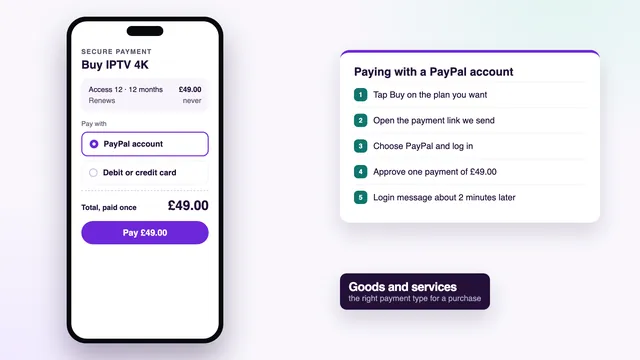
A member of the team answers in English with a link to a page run by a payment company, which takes debit or credit card or PayPal. Card details go on that page and never reach us.
Enter the card or sign in to PayPal, approve in your banking app if your bank asks, and the whole price is paid. No second amount follows.
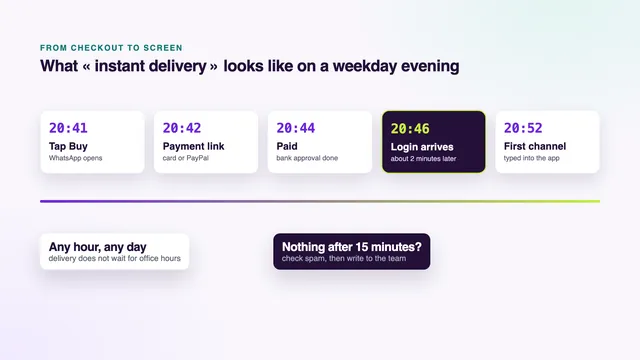
About 2 minutes after the payment is confirmed, whatever the hour, the details land on WhatsApp or by email: username, password, server URL, M3U link, guide link, end date.
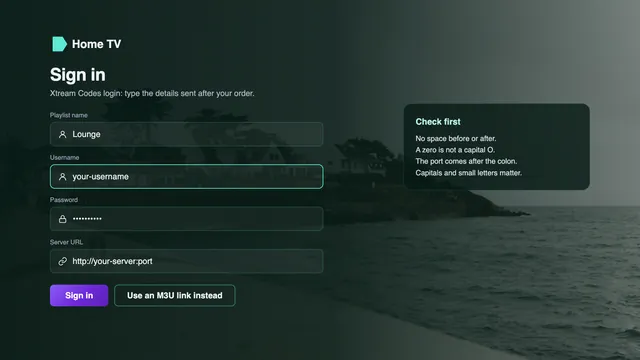
On each screen, open the player, choose its Xtream Codes login and enter the three details. Channels and listings load within a minute or two; the team can guide you through it.
Why WhatsApp and not a basket? Because a person reads each order before the payment link goes out. If the plan you tapped does not suit your TV, or your screens call for the two-screen plan, you hear it before paying. The same thread then becomes your help line, with your order already in it.
Ordering at two in the morning works exactly as at two in the afternoon: the team is on WhatsApp and email 24/7. No message after a few minutes? Look in the spam folder, then reply on the same thread.
Delivery
What lands on your phone a couple of minutes after paying, and where each line goes.
Everything you pay for arrives as one message on WhatsApp or by email. Keep it: it is your proof of purchase, your setup sheet and your end-date reminder in one.
Account name and passcode. Your username and password. Both are case-sensitive, so a phone keyboard that capitalises the first letter will make the player refuse them.
Host URL. The server address, written like http://your-server:port. Copy all of it, http:// and the number after the colon included. With the two lines above, it makes the Xtream Codes login most players ask for.
Playlist (M3U). One long link listing every channel and title, for apps with no Xtream option, such as VLC, Kodi or Smart IPTV.
EPG link. The XMLTV address of the programme guide. Xtream players fetch the guide themselves; M3U players need this link pasted into their guide setting.
Valid until. Your end date. On that day the login stops on every screen at once.
Your order message, about 2 minutes after checkout
Blanked out here: the real values are in the message we send you.
A login the player turns down is nearly always a typing slip: a character missing, a space at the end, or the letter O where a zero belongs. Paste the details where the device allows it, or ask the team to resend them laid out for a TV remote. Searching to buy IPTV account details on their own? These six lines are the whole account, and that guide explains each rule attached to it.
Paying
Buy IPTV UK-wide with a card from your own bank or with PayPal: one payment in pounds, on a payment company’s page, with nothing left behind that could charge you again.
 One payment, nothing stored
Type the card on the payment company’s secure page, never in a chat. Most UK banks then ask you to approve, which takes seconds.
Strong Customer Authentication, often called 3D Secure: an app prompt, a text code or a card-reader code. A refusal is usually the fraud check; approving in the app or calling the bank clears it.
Pay from a PayPal account, or with a card used through PayPal. What its buyer protection covers is set by PayPal’s current terms: read them on PayPal’s own pages, not in any seller’s summary.
We never see the card number and keep no payment details. With no saved card and no mandate in place, the end date cannot become a charge.
The payment company sets the name shown on your card or PayPal statement. Ask the team before paying and they will tell you what it reads.
Within 7 days of paying, the full amount is returned to the card or PayPal account that paid, in the two cases set out just below.
| Situation | Refunded within 7 days? | Why |
|---|---|---|
| The login message never arrived | Yes, in full | You paid for a login and did not receive it. |
| No screen displays anything, even with the team’s help | Yes, in full | The access does not work in your home. |
| You changed your mind after it played | No | The access was delivered and worked. |
| 4K stutters on a line slower than the speed given before you paid | No | HD and Full HD still play. |
| You ask after day 7 | No | The window runs 7 days from the payment date. |
Chargeback and Section 75. When a seller takes the money and delivers nothing, your card issuer can try to reverse a debit or credit card payment through a chargeback. Each bank sets its own time limit, often around 120 days, and expects you to contact the seller first. Section 75 of the Consumer Credit Act only covers credit-card purchases of more than £100 and up to £30,000; our dearest plan costs £89, so it does not apply, though a chargeback can still be requested. A bank transfer, a gift card or crypto leaves no issuer to turn to at all. The guides to paying by credit or debit card and through PayPal go through each checkout screen.
Before you pay anyone
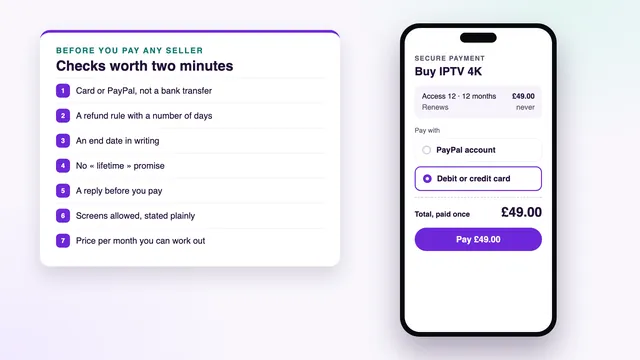
These checks work on every seller you look at, us included. Each sign on the left has an answer you can find in writing on the right.
Ask a question before you pay anyone, even one you can answer yourself. Which app runs on my TV? What happens on the end date? The speed and tone of the reply tell you more than any badge, and a seller who goes quiet before the sale rarely turns chatty after it.
Then turn every price into a cost per month. An offer without an end date gives you nothing to divide by, so there is nothing to compare and nothing to hold the seller to. The guide Buy IPTV online: checks before paying sets out ten such checks, with the questions to send.
Screens and apps
Any compatible player can read the login, so your screens decide which app you use. We publish and sell no app, box or stick. Choose your device below.
4K HDR, where the source carries it, plays on the Fire TV Stick 4K, the Stick 4K Max and the Fire TV Cube. Lite and basic sticks from earlier years top out at Full HD.
The Amazon Appstore does not carry it. Get Downloader, made by AFTVnews, from the Appstore, then under Settings › My Fire TV › Developer options let Downloader “Install unknown apps”. The download link is in your login message.
In Settings › My Fire TV › About, press select on the stick’s name seven times and the menu appears.
A few of Amazon’s newest sticks run Vega OS and accept Appstore apps only. Read the model before you pay for a stick.
Smarters Pro is in some sets' stores and not others, by model and country. Search the TV’s own store first.
Smart IPTV needs activating once on each TV; the playlist is then sent from its website with the MAC address the set displays. IBO Player links the playlist to that MAC address, or to the set’s device key.
Dolby Vision works on LG OLED and QNED sets; Samsung uses HDR10+ and leaves Dolby Vision out. No usable app at all? A stick or an Android box in an HDMI port solves it.
Designed for Android TV and Fire TV. Installing it costs nothing, with paid premium options. Google Play supplies it and the other players on Android TV and Google TV sets.
An APK file picked up from a forum can hide malware. Keep to each app’s store version.
Most boxes sold for this are Android boxes. A certified one gets Google Play and security updates; uncertified ones often get none. Look for 4K at 60 Hz, HEVC in hardware, 2 GB of RAM, Ethernet and 5 GHz Wi-Fi.
The App Store is the only source of apps, and Smarters Pro is listed there for Apple TV. In Settings › Video and Audio › Match Content, switch Match Frame Rate and Match Dynamic Range on.
Tech Smarters Private Limited publishes Smarters Pro free on the App Store; an optional Premium is sold inside the app, at a price that differs between stores.
Smarters Pro runs on Apple silicon Macs much as it does on an iPad, and VLC plays the M3U link on any Mac.
VLC is free and opens the M3U link. Kodi needs its PVR IPTV Simple Client add-on switched on first.
Smarters Pro and VLC from Google Play, handy for checking the login before the TV is set up.
Copycats borrow the Smarters name and icon. The developer’s name on the store page tells them apart.
Plenty of people buy IPTV box online listings first, then find that a box arrives with no access in it: the channels come from the login, whatever plays it. The guide on whether to buy IPTV box hardware at all lists the specs worth paying for before you spend anything on a device.
What you can watch
Countries first, categories inside each country, and the UK at the top: the British groups are the first thing the player shows.
Evening shows, comedy, quizzes and reality, plus channels devoted to drama and the box sets you follow week by week.
Rolling British news and current affairs at the top, other countries’ news filed under each country.
Football and rugby, cricket and tennis, golf, snooker, darts, boxing and motor racing, in the UK sport group and in each country’s sport folder.
Film channels sorted by genre, sitting beside the on-demand library rather than replacing it.
Separate groups for young children and older ones, quick for a parent to find and pin as favourites.
Nature, history and science; music channels; regional editions of the big UK channels, local news included.
 Kids' groups within easy reach
Films and series on demand. The library holds 120,000 titles, mostly in English, the others with subtitles you switch on from the player’s menu. Browse films by genre or year and series by season; most players remember where you stopped. Every plan includes the whole library, with no rental fee per title.
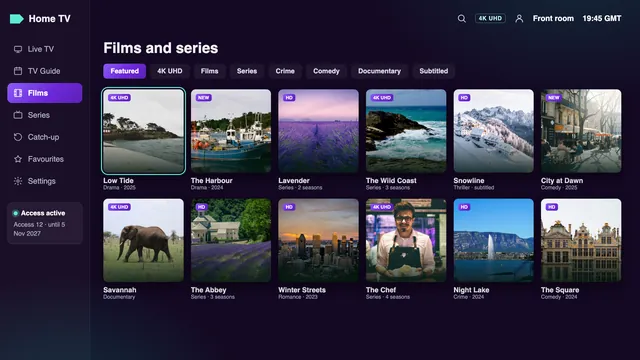
You will not find channel names on this page, only categories. When one channel matters more than the rest, name it in your WhatsApp message before paying and the team will say which group holds it. A household that also watches in a second language finds that country’s folder in the same list, under the same login.
Picture and broadband
Quality follows the source. Here is what each part depends on, so nothing on the receipt promises more than your screen can show.
Every stream keeps the resolution its source was made in. Most channels are HD or Full HD; whatever was produced in 4K reaches 4K UHD, 3840 × 2160 pixels. HDR and Dolby Atmos come through only if the source carries them and both player and TV can show them.
Where the source allows it, live sport runs at 50 frames a second, so a fast ball stays sharp. The live picture trails the broadcast by a few seconds, sometimes by about half a minute.
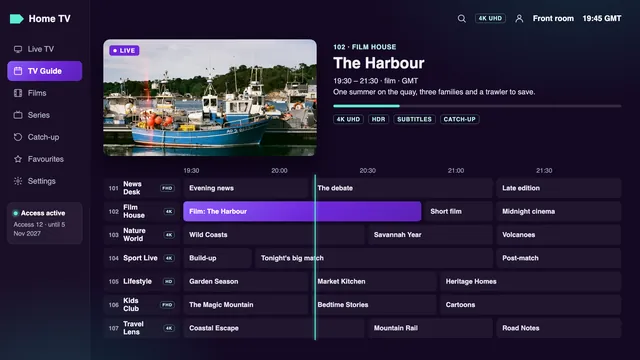
A week of listings comes with the Xtream login: GMT through the winter, BST between the final Sundays of March and October. Guide an hour out? Adjust the player’s EPG time offset.
Channels that offer it let you replay programmes, usually up to seven days back. The guide marks which listings can be replayed; the symbol differs from one app to the next.
 50 fps when the source has it
On 5 November 2026 the clocks show GMT. After each change the guide may sit an hour off until you move the offset by one hour; your plan itself needs nothing.
| Steady speed, measured on the device | HD | Full HD | 4K UHD |
|---|---|---|---|
| One screen | 5 Mb/s or more | 10 Mb/s or more | 25 Mb/s or more |
| Two screens on Access 12 Duo | double: 10 Mb/s | double: 20 Mb/s | double: 50 Mb/s |
| Connection | Ethernet or 5 GHz Wi-Fi | Ethernet, or 5 GHz Wi-Fi a few metres from the router | Ethernet, a 4K TV on HDMI 2.0 or newer, HEVC (H.265) decoded in hardware |
Run the speed check on the device that will play, in the evening: the UK peak falls roughly between 19:00 and 23:00, heaviest at weekends and on big match nights. Several servers share our load then; at home, Wi-Fi is the usual weak link. Ethernet to the TV is the surest fix, then 5 GHz close to the router, or powerline and mesh kits when the router is a floor away.
Price check
People who set out to buy IPTV subscription deals usually compare monthly prices, so every figure below is split into months and days. Market figures were seen on offers online on 5 November 2026; prices vary by seller.
| Per month | Per day | For a year | Commitment | |
|---|---|---|---|---|
| Access 12 from Buy IPTV 4K | £4.08 | 13p | £49 | 12 months, paid once, ends by itself |
| Access 24 from Buy IPTV 4K | £3.71 | 12p | £44.50 a year over two | 24 months, paid once |
| Access 12 Duo, two screens | £6.58 | 22p | £79 | 12 months, paid once |
| One month bought alone, seen online | £6.99 to £22 | 23p to 72p | £83.88 to £264 if bought twelve times | Month by month |
| Twelve months, seen online | £3.33 to £5.42 | 11p to 18p | £39.99 to £65, middle near £55 | Usually twelve months |
| Two screens for a year, seen online | £8.00 to £8.33 | 26p to 27p | £96 to £100 | Usually twelve months |
| Pay-TV bundle with sport and films | £60 or more | £1.97 or more | £720 or more | 18 or 24 months, then it rolls on |
On those figures Access 12 sits below the middle of the twelve-month range seen online, and Access 12 Duo under the £96 to £100 asked elsewhere for two screens. A month bought alone runs at 23p to 72p a day, against 32p on Access 3.
If the aim is to buy IPTV cheap, compare the cost per month of viewing, not the figure on a banner. The lowest sticker usually belongs to the shortest stretch on offer and can cost more over a year than one payment for twelve months. A price far below every range above is a warning sign, not a bargain.
A pay-TV bundle with sport and films is a different product: equipment fitted at home, a contract of 18 or 24 months and often £60 or more a month, at the time of writing, so a year can pass £720. Here a year costs £49, and the trade-off is that nobody comes to install anything: you bring the player, the screen and the broadband.
After you buy
What happens during the plan, on its last day, and if you want more.
| Date | On your side | On ours |
|---|---|---|
| 5 November 2026 | £49 leaves your account once, for Access 12. | No mandate, no stored card. |
| 2 minutes or so later | Login message received, end date included. | Saved, then typed into the player. |
| Through the year | Channels, library and guide stay the same. | Help on WhatsApp or email, 24/7. |
| The final weeks | No reminder bill, no renewal notice. | You decide on another plan, or none. |
| 5 November 2027 | The login switches off on every screen. | There is nothing to stop; a new order is up to you. |
Tap Buy on any plan at that day’s prices. A new login follows, with its own end date, typed into the apps you already have.
The only plan with two screens playing at the same moment: £79 for 12 months, or £3.29 a month per screen. Two Access 12 plans would cost £98.
Every plan belongs to one home. A login used in another house, or posted publicly, can be suspended. No plan covers three or four screens.
Install a player on the new set and type the same details; the end date belongs to the login, so it stays put.
Mind the timing when you order again: a new plan’s months start on the day you pay for it, not on the old end date. Pay a week early and you get a week of overlap; pay the morning after and you lose an evening. Most people order a day or two before.
Buy IPTV, subscribe for the length you chose, and that is the whole arrangement: no bill on the end date, no cancellation call, no notice period in small print.
Reviews
★★★★★
A wide selection of UK channels and international programmes. Plenty of entertainment options for different tastes.
★★★★★
The movie and series selection is interesting. I like having different genres available whenever I want something to watch.
★★★★★
The sports categories are particularly interesting. There is a good range of football and other sporting content.
★★★★★
The application is simple to navigate on my Smart TV. Finding different channels and entertainment categories is straightforward.
★★★★★
I particularly enjoy the international channels and the variety of films available in the VOD section.
★★★★★
A convenient entertainment option with plenty of different programmes, from movies and series to international television.
FAQ
A login for live TV (40,000+ channels) and on-demand viewing (120,000 films and series), with a 7-day guide and catch-up where a channel offers it. It comes as one message (Xtream Codes details, M3U link, guide link, end date) and plays in a player app on a screen you already own.
Tap Buy on a plan. WhatsApp opens with the plan and price typed in; send it and the team answers with a link to a secure payment page (debit or credit card or PayPal). The login follows about 2 minutes after the payment is confirmed.
A one-off plan, paid once in pounds, with no direct debit and no saved card behind it. The login simply stops on its end date; carrying on is a new order that you choose to place.
Yes. Email [email protected] with the plan you want and the payment link comes back by email. The login then arrives by email as well, about 2 minutes after the payment goes through.
Access 12 for a single TV: £49, so 13p a day over a year. Access 3 at £29 is a shorter first order, Access 24 at £89 has the lowest monthly cost (£3.71), and Access 12 Duo at £79 covers two screens at once.
Around 2 minutes once the payment is confirmed, day or night, on WhatsApp or by email. If it has not appeared, check the spam folder, then reply on the thread and the team resends it.
Yes, in full, if you claim within 7 days of paying and either the login never came or no screen would display anything even with the team helping. A change of heart is not covered, nor is 4K on a line below the speed we gave before the sale.
You type the card on a payment company’s page; we never see the number and nothing is kept. Your bank may ask you to approve in its app. If a seller delivers nothing, your card issuer can attempt a chargeback; Section 75 does not apply, because every plan costs less than £100.
Wherever the checks come out right: card or PayPal at checkout, an end date written down, a money-back window stated in days, and a fast reply when you ask something before paying. Run them on any seller, us included; the guide on where to buy IPTV compares seller sites, marketplaces and social pages.
Credits are sold in bulk to people who resell access to other households, not to homes that want to watch. A household buys a plan: one login, one or two screens and an end date, delivered straight to you.
Guides
Ten guides, one question each: paying by PayPal or card, Firestick and Smart TV checks, playlists, accounts, delivery times, where to buy, the checks before paying, and boxes.
 Buying guide
 Buying guide
 Buying guide
Access 12: £49 paid once for 12 months, 13p a day. Bought on 5 November 2026, it ends on 5 November 2027, and nothing is charged after that.
Access 12: £4912 months · £4.08 a month
Buy