Buying guide
Buy IPTV with Credit Card or Debit Card: the Card Checkout Explained
You can buy IPTV with credit card or debit card details at Buy IPTV 4K, but only on the payment company’s secure page: the card number never goes into a chat, an email or anything we run. This guide takes the card checkout from the link the team sends to the line on your statement, with the bank approval step, the usual reasons a card is declined, and what chargeback and Section 75 can and cannot do for a plan that costs less than £100.
Debit card or credit card: what changes
A debit card takes the money from your current account straight away. A credit card borrows it, and you repay on your statement date; leave a balance unpaid and the card’s interest applies. For a single payment of this size, the choice is mostly about which account you want the money to leave.
Whether you buy IPTV with credit card or debit card details, nothing changes on our side: the same page, the same price, the same login. We learn that a payment came through and how much it was, never the card number. Prices run from £29 for Access 3 to £89 for Access 24, and the packages page breaks each one down per month and per day.
| Debit card | Credit card | |
|---|---|---|
| Where the money comes from | Your current account, at once | Your credit limit, repaid later |
| Bank approval (SCA) | Usually asked | Usually asked |
| Chargeback through the card issuer | Can be asked | Can be asked |
| Section 75, Consumer Credit Act | Does not apply | Only above £100 and up to £30,000 |
| Stored for the next order | No | No |
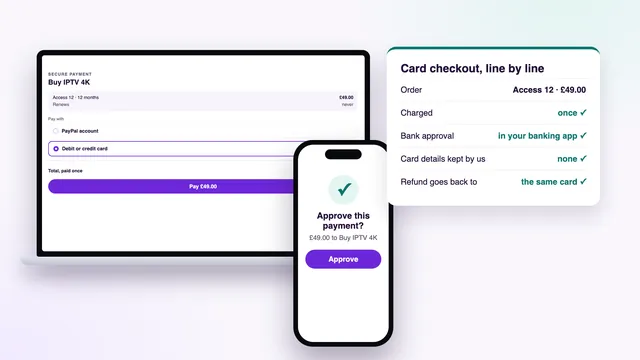
| Where a refund goes | Back to the same card | Back to the same card |
Buy IPTV with credit card details on the secure payment page
The card part of the order happens on one page, run by the payment company that handles the payment for us. The order of events:
- Tap Buy on a plan in the plan list on the home page. WhatsApp opens with the plan and its price typed in; send it. If you would rather use email, write to [email protected] with the plan name.
- Tell the team you will pay by card. A secure payment link comes back in the same conversation.
- Open it and look the page over before you type anything (what to look for is just below).
- Enter the card number, the expiry date, the security code and the name on the card, plus anything else the page asks for, such as a billing postcode.
- Press pay. Your bank steps in to approve, usually through its app or a code sent by text.
- The page confirms the payment. You can close it.
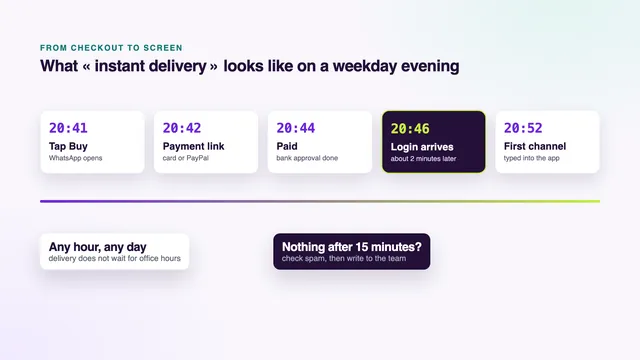
- About 2 minutes later, the login message arrives in the chat or your inbox.
What a genuine payment page shows
- an address beginning with https, with a padlock beside it;
- the exact plan price in pounds, for example £49.00 for Access 12 or £79.00 for Access 12 Duo;
- fields for the card details, and nothing asking for your card PIN or your online banking password;
- an approval step after you press pay, shown by your bank rather than by the seller.
No payment page ever needs your card PIN, and your banking password belongs only in your bank’s own app or website. A page that asks for either is not one to trust, however professional it looks.
Bank approval: SCA and 3D Secure
Most UK card payments made online now need your bank’s approval before they go through. The rule behind it is Strong Customer Authentication, or SCA, and the screen you see is often called 3D Secure. It shows the bank that the person paying holds the card, not just its number.
Your bank picks the method. The three you are likely to meet:
- A prompt in your banking app. A notification appears on your phone; open it, check the amount and the merchant, then approve with your fingerprint, face or app passcode.
- A code by text. A one-time code arrives by text message; type it into the bank’s box on the payment page.
- A card reader. Some banks use a small reader: put the card in, enter your PIN on the reader itself, and type the number it shows into the bank’s box.
Each method has a time limit. Take too long and the approval lapses, and the payment does not go through. Have your phone unlocked and within reach before you press pay, especially if your banking app asks you to sign in again each time.
Approving in the app usually also clears a payment the bank’s fraud check has paused. If no notification appears, open the banking app yourself and look for the request there.
Why a card payment gets declined, and what to do
A decline is a message from the bank or the payment page, not a verdict on you. The cause usually shows in the wording on screen, or in your banking app a minute later.
| What you see | Likely cause | What to do |
|---|---|---|
| Declined straight after pressing pay | A typing slip in the card number, expiry date or security code | Retype the details slowly, reading them from the card itself |
| The approval screen closed or timed out | The bank’s prompt was not answered in time | Open the link again and approve as soon as the prompt appears |
| Approval refused, or a fraud warning | The bank’s fraud check stopped the payment | Approve it in your banking app, or call the number on the back of the card |
| A balance or limit message | Not enough money in the account, or no credit left on the card | Use another card or pay through PayPal |
| Declined every time on one card | Online payments switched off, or the card frozen in the banking app | Check the card settings in the app and turn online payments back on |
A payment that seems to hang is different from a decline. Before you try again, ask the team whether anything came through. They can see confirmed payments, and checking first avoids paying twice for one plan.
If one card keeps failing, paying through PayPal instead is the other choice on the same link, and PayPal may let you use a different card through its own page.
What never to send by chat or email
We have no use for your card details, so nothing about your card belongs in a WhatsApp message or an email to us. The payment company takes the card on its own page and your bank approves it in its own app. That leaves nothing for you to send.
What you can send if a payment needs looking into: the plan you chose, the time you paid and the amount. Those three are enough to find the order, and none of them lets anyone use your card.
Anyone who wants to buy IPTV with credit card payments from any seller can use the same rule as a quick check. A seller who asks you to type the number into a chat, or to read it out on a call, is skipping the payment page for a reason. Walk away and keep your card.
The line on your card statement
The name shown on your card statement is set by the payment company, not chosen by us, and it may not read « Buy IPTV 4K » word for word. To avoid a surprise, ask the team before you pay what the line will look like; they will tell you.
When the payment appears, check it against your confirmation: the amount in pounds and the date should match. It is one payment, so one line. The card is not stored afterwards, which is why nothing else from us can appear on a later statement.
If you buy IPTV with credit card or debit card and later spot a line you do not recognise, write to the team before calling your bank. It may simply be our payment under the payment company’s name, and a message clears that up before a dispute is opened for nothing.
Chargeback and Section 75 for a plan under £100
Section 75 of the Consumer Credit Act is a protection that applies only to credit card purchases of more than £100 and up to £30,000. Every plan here costs less than £100: the dearest, Access 24, is £89. So Section 75 does not apply to these orders, whichever card you use.
Chargeback is a separate route. With a debit or a credit card, the card issuer can try to reverse a payment when the goods or services were not provided. It is the bank’s own process with the bank’s own time limits, often around 120 days, so check the limit on your card.
Banks expect you to ask the seller first, and so do we. If the login never came or nothing ever played, the 7-day rule pays you back directly, with no form to fill in at your bank.
When a chargeback makes sense
With any seller, a chargeback is the step after asking. If you wrote, waited and got no answer, or were refused something the seller’s own rule promised, call the number on your card. Have the order chat, the payment confirmation and the login message, if one came, ready before you call.
Refunds back to the card
Within 7 days of payment, a full refund is due in two cases only: the login never reached you, or no picture appeared on any screen even after the team worked through the setup with you. Changing your mind is not one of them. Nor is a connection too slow for 4K when the speed needed was explained before you paid.
The money goes back to the card you paid with: never in cash, never to another card, never by bank transfer. How long it takes to show on your statement depends on your bank. If you have cancelled or replaced the card in the meantime, tell the team, and ask your bank how it handles a refund made to the old card.
The full wording is on the refund policy page. For what happens once a card payment succeeds, see how fast the login message arrives; for the order from start to finish, how to buy IPTV step by step. And if you are still weighing up the access itself, what an IPTV account holds once you have paid lists the username, end date and screens.
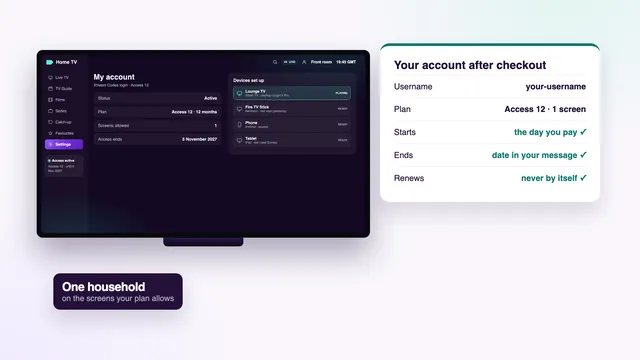
Card or PayPal, you buy IPTV once, with no repeat charge, and the end date is written in your login message from day one.
Frequently asked questions
Is it safe to buy IPTV with credit card details online?
It depends on where the details go. Here they are typed only into the payment company’s secure page, and your bank approves the payment in its own app or screen. The card number never passes through a chat, an email or our site.
Is my card kept for the next order?
No. Nothing is stored and nothing renews, so access simply stops on the end date. A later order is a new payment, with the card typed again on the payment page and a new login sent afterwards.
Does Section 75 protect my order?
No. It covers credit card purchases above £100 only, and the dearest plan here is Access 24 at £89. A chargeback through your card issuer can still be asked if a service was not provided, once you have asked us first.
Why does my bank want me to approve the payment?
That is Strong Customer Authentication, used on most online card payments in the UK. Your bank checks it is really you, through an app prompt, a text code or a card reader. Approve it in time and the payment goes through.
What will my card statement say?
The payment company sets the name on the line, so it may not match our brand exactly. Ask the team before paying and they will tell you what to expect.
My card was declined twice. What now?
Look in your banking app for a fraud alert or a frozen card, then approve the payment or call the bank. Ask the team whether anything came through before a third attempt. PayPal, on the same link, is the other way to pay.